


Introducing Audiobook entities to the Amazon Music API
Introducing Audiobook entities to the Amazon Music API
Today we are launching three new entities in the Firefly API: “audiobook”, “user.audiobooks”, and “user.audiobookWishlist”. These new entities can be used to 1) build an audiobook detail page with information such as summaries, ratings, and sample playback; 2) identify audiobooks added to the customer’s library; and 3) retrieve the customers’ audiobook wishlists.
Using the New Entities
As a Harry Porter fan, I’ll be testing the new entities using my favorite book in the series, “Harry Potter and the Prisoner of Azkaban”. To start, I’ll retrieve the audiobook’s ASIN, B0D1CW8W56, by searching for it on Audible and extracting it from the URL.
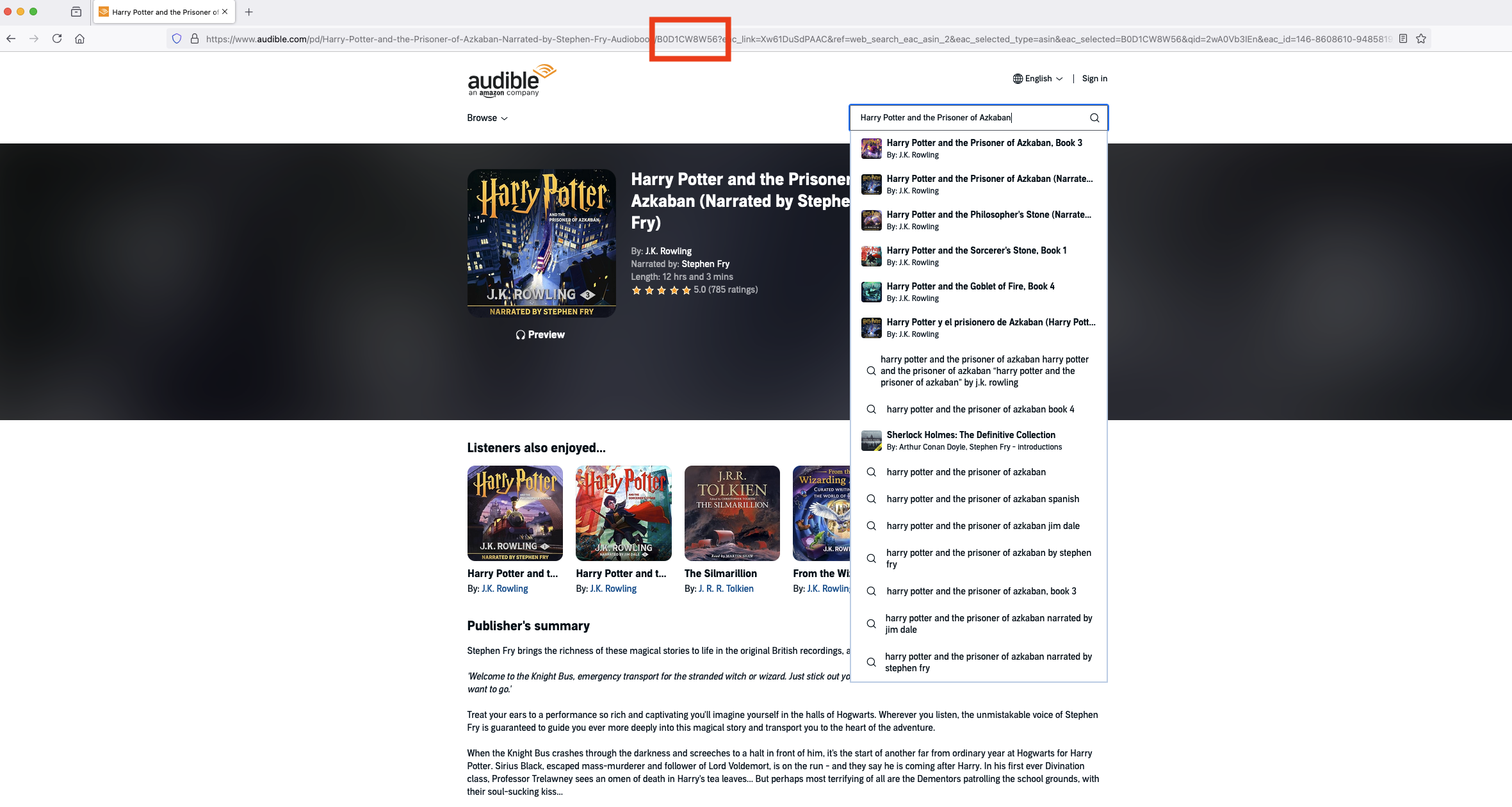 When i query the audiobook entity using the ASIN with this query in Insomnia:
query audiobook {
    audiobook(id: "B0D1CW8W56") {
        id
        title
        libraryContext {
            isInLibrary
            dateAdded
            sourcedFrom
        }
        narratorNames
        duration
        description
        productRating {
            overallRating
        }
        images {
            id
            url
            imageType
            width
            height
        }
        language
        publisher
        releaseDate
        uri
        previewUrl
        authors {
            id
            name
        }
    }
}
I have the audiobooks’ detail information such as title, author, narrator, duration, images, description, sample playback, and ratings information.
{
    "data": {
        "audiobook": {
            "id": "B0D1CW8W56",
            "title": "Harry Potter and the Prisoner of Azkaban (Narrated by Stephen Fry)",
            "libraryContext": {
                "isInLibrary": false,
                "dateAdded": null,
                "sourcedFrom": null
            },
            "narratorNames": [
                "Stephen Fry"
            ],
            "duration": 43380,
            "description": "<p>Stephen Fry brings the richness of these magical stories to life in the original British recordings, available for the first time in the United States and Canada.</p>",
            "productRating": {
                "overallRating": 0.9899868247694334
            },
            "images": [
                {
                    "id": "51c7Hf-qC7L",
                    "url": "https://m.media-amazon.com/images/I/51c7Hf-qC7L.jpg",
                    "imageType": "PRIMARY",
                    "width": 500,
                    "height": 500
                },
                {
                    "id": "91Hc8fK89oL",
                    "url": "https://m.media-amazon.com/images/I/91Hc8fK89oL.jpg",
                    "imageType": "PRIMARY",
                    "width": 2400,
                    "height": 2400
                }
            ],
            "language": "english",
            "publisher": "Pottermore Publishing",
            "releaseDate": "2024-04-18T07:00:00Z",
            "uri": "mrn:1.0:audible:audiobook:asin:B0D1CW8W56?marketplaceid=AF2M0KC94RCEA",
            "previewUrl": "https://samples.audible.com/bk/potr/000565/bk_potr_000565_sample.mp3",
            "authors": [
                {
                    "id": "B000AP9A6K",
                    "name": "J.K. Rowling"
                }
            ]
        }
    },
    "extensions": {}
Now, let’s add this book to my wish list!
mutation addAudiobookToWishlist {
    addAudiobookToWishlist (id: "B0D1CW8W56") {
        id
        title
    }
}
Next, let’s query the wishlist entity to ensure the audiobook has been successfully added!
query wishlist {
    user {
        audiobookWishlist {
            edges {
                node {
                    id
                    title
                }
            }
        }
    }
}
I get this response back confirming it’s been added:
{
    "data": {
        "user": {
            "audiobookWishlist": {
                "edges": [
                    {
                        "node": {
                            "id": "B0D1CW8W56",
                            "title": "Harry Potter and the Prisoner of Azkaban, Book 3"
                        }
                    }
                ]
            }
        }
    },
    "extensions": {}
}
Furthermore, I can check which audiobooks I have purchased. When querying the purchased audiobook information, You can also easily access all metadata for each audiobook entity. The same audiobook entity is linked to different types of edges. In this case, it can be traversed from user -> audiobooks -> edges -> nodes. Alternatively, you can directly call the audiobook.
query {
    user {
        audiobooks {
            edges {
                dateAdded
                sourcedFrom
                listeningProgress
                node {
                    id
                    title
                    libraryContext {
                        isInLibrary
                        dateAdded
                        sourcedFrom
                    }
                    narratorNames
                    duration
                    description
                    productRating {
                        overallRating
                    }
                    images {
                        id
                        url
                        imageType
                        width
                        height
                    }
                    language
                    publisher
                    releaseDate
                    uri
                    previewUrl
                    authors {
                        id
                        name
                    }

                }
            }
        }
    }
}
I get back the book I am currently listening from Scott Brick:
{
    "data": {
        "user": {
            "audiobooks": {
                "edges": [
                    {
                        "dateAdded": "2020-02-08T06:33:59.428Z",
                        "sourcedFrom": "AUDIBLE",
                        "listeningProgress": 26.78,
                        "node": {
                            "id": "B002UZLEFS",
                            "title": "Alexander Hamilton",
                            "libraryContext": {
                                "isInLibrary": true,
                                "dateAdded": "2020-02-08T06:33:59.428Z",
                                "sourcedFrom": "AUDIBLE"
                            },
                            "narratorNames": [
                                "Scott Brick"
                            ],
                            "duration": 129480,
                            "description": "<p>Historians have long told the story of America’s birth as the triumph of Jefferson’s democratic ideals over the aristocratic intentions of Hamilton....</p>",
                            "productRating": {
                                "overallRating": 0.9582840115923099
                            },
                            "images": [
                                {
                                    "id": "41CPS3JoO6L",
                                    "url": "https://m.media-amazon.com/images/I/41CPS3JoO6L.jpg",
                                    "imageType": "PRIMARY",
                                    "width": 499,
                                    "height": 500
                                },
                                {
                                    "id": "81Cktx5+nYL",
                                    "url": "https://m.media-amazon.com/images/I/81Cktx5+nYL.jpg",
                                    "imageType": "PRIMARY",
                                    "width": 2397,
                                    "height": 2400
                                }
                            ],
                            "language": "english",
                            "publisher": "Penguin Audio",
                            "releaseDate": "2004-12-26T11:29:00Z",
                            "uri": "mrn:1.0:audible:audiobook:asin:B002UZLEFS?marketplaceid=AF2M0KC94RCEA",
                            "previewUrl":"https://samples.audible.com/bk/peng/000340/bk_peng_000340_sample.mp3",
                            "authors": [
                                {
                                    "id": "B000AQ735Y",
                                    "name": "Ron Chernow"
                                }
                            ]
                        }
                    }
                ]
            }
        }
    }
Things to know
These new entities are primarily designed for Amazon Music developers first and foremost, since they are already familiar with Firefly and can easily and quickly onboard to build new experiences with Audiobook content. That said, these entities are also available to internal developers across Amazon. In the near future, we plan to extend access to third-party developers through the Phoenix API.
Looking forward, we are actively working to add audiobook recommenders through the existing “recommendationCollection” entity. This means developers can retrieve recommendations across audiobook, music and podcast via a single recommender. These recommenders will work out of the box from existing recommendationCollections. Also, we are adding audiobook categories (e.g., “Business”, “Mysteries & Thrillers”) into the existing “browseRecommendations” entity (e.g., music genres such as “Jazz”, “Alternative”). These new categories allow customers to navigate to different selections of audiobooks based on book genres.